Swarmia MCP

Your engineering data, in every AI agent

Connect Claude, Cursor or your own agents to Swarmia. Ask about delivery, AI impact, cost and effort, and get answers built on a complete model of your engineering organization, not thousands of raw API calls.

claude mcp add swarmia --transport http https://app.swarmia.com/api/v1/mcp

Works with ClaudeClaude CodeCursorany MCP client

claude — ~/code/core

> Where is delivery getting stuck in each team?

● swarmia · EntityReportchange lead time, last 90 days

● swarmia · EntityQueryPullRequest, slowest by stage

● swarmia · EntityQueryIssue, stuck in progress

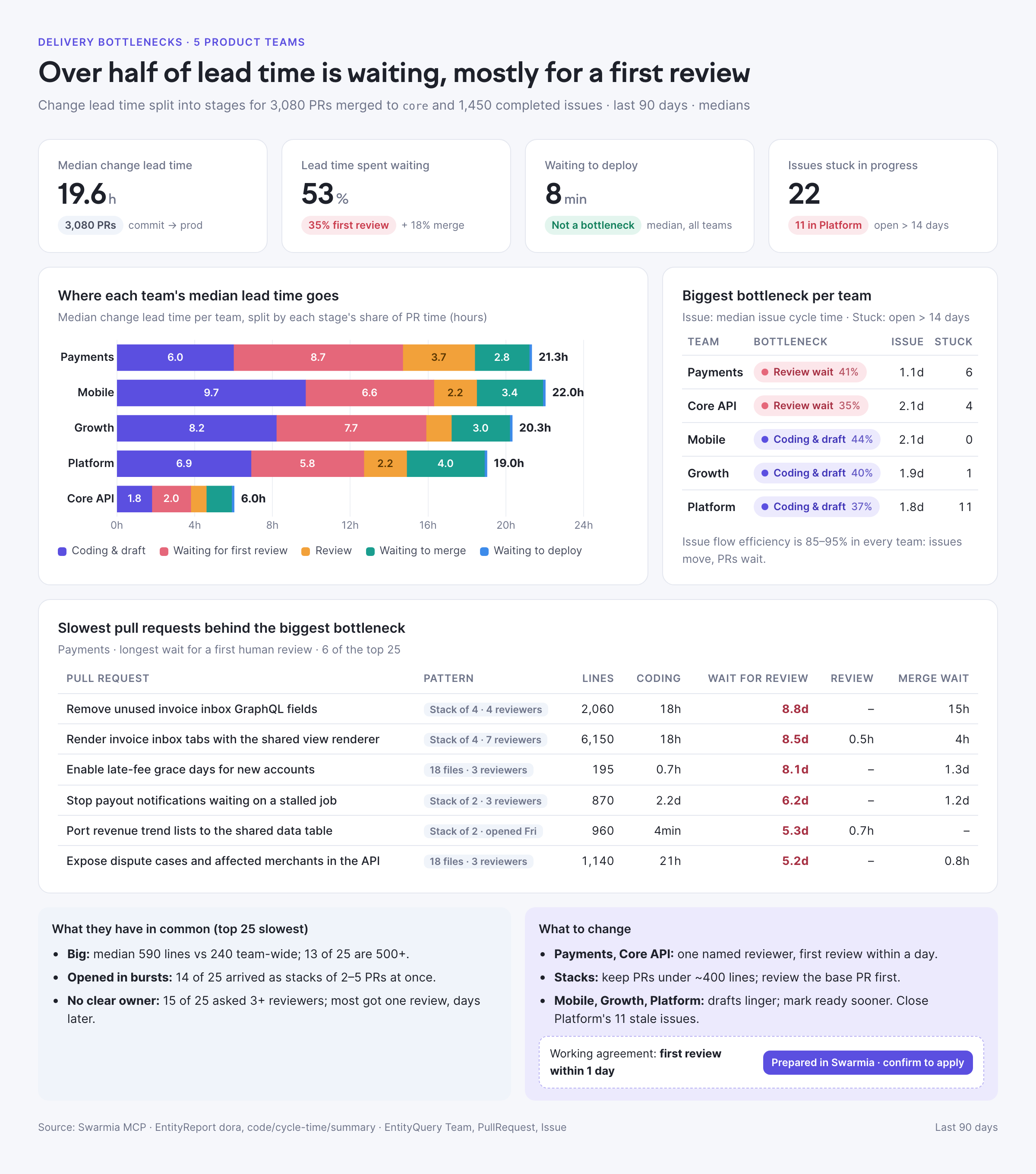
Over half of lead time is waiting, mostly for a first review. In Payments, the slowest pull requests are large, arrive in stacks and ask 3+ reviewers, so nobody owns them…

✓ Wrote delivery-bottlenecks.html

Prompt → result

Ask once. Get the whole analysis.

Every example below is a real prompt we ran through the Swarmia MCP in Claude, and the page it produced. Only the names and numbers are changed.

For engineering leaders

The questions that used to take an analyst a week: what the board needs to hear, and whether the AI budget is working.

Board reporting

A board one-pager in one prompt

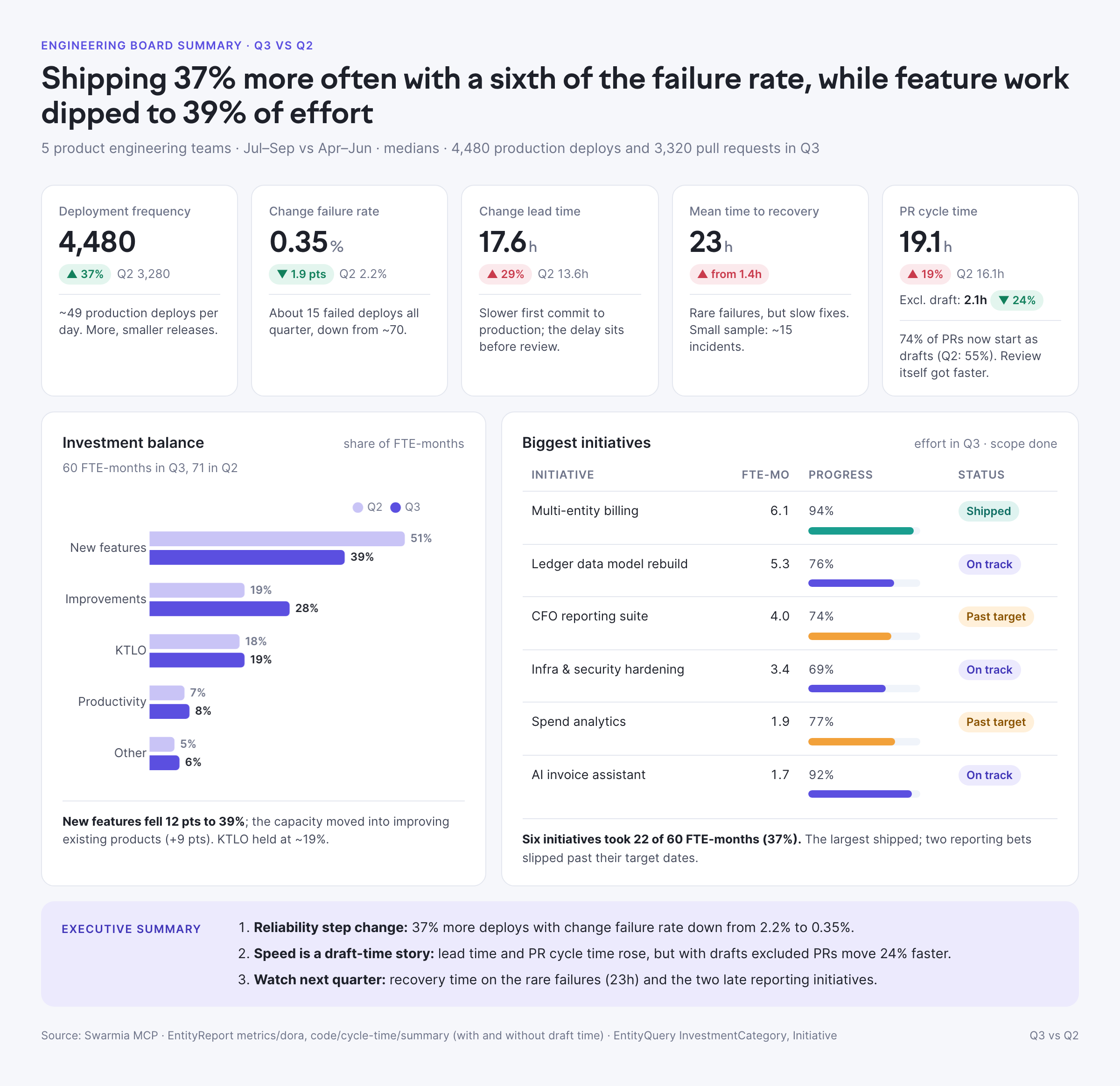
DORA metrics, where engineering effort went and how the biggest initiatives are doing, quarter over quarter, with a line of interpretation for each. The kind of page that used to take a week of spreadsheets.

You

Write a one-page engineering summary for our board: last quarter vs the previous one. DORA metrics and PR cycle time (medians, also without draft time), how effort split across investment categories, and our biggest initiatives with effort and progress. One-line interpretation per part, as an HTML page with a chart.

  • EntityReport · metrics/dora
  • EntityReport · cycle time
  • InvestmentCategoryQuery
  • EntityQuery · Initiative
board.html
Engineering summary for the board, generated by Claude from Swarmia data
AI impact

Is our AI investment paying off?

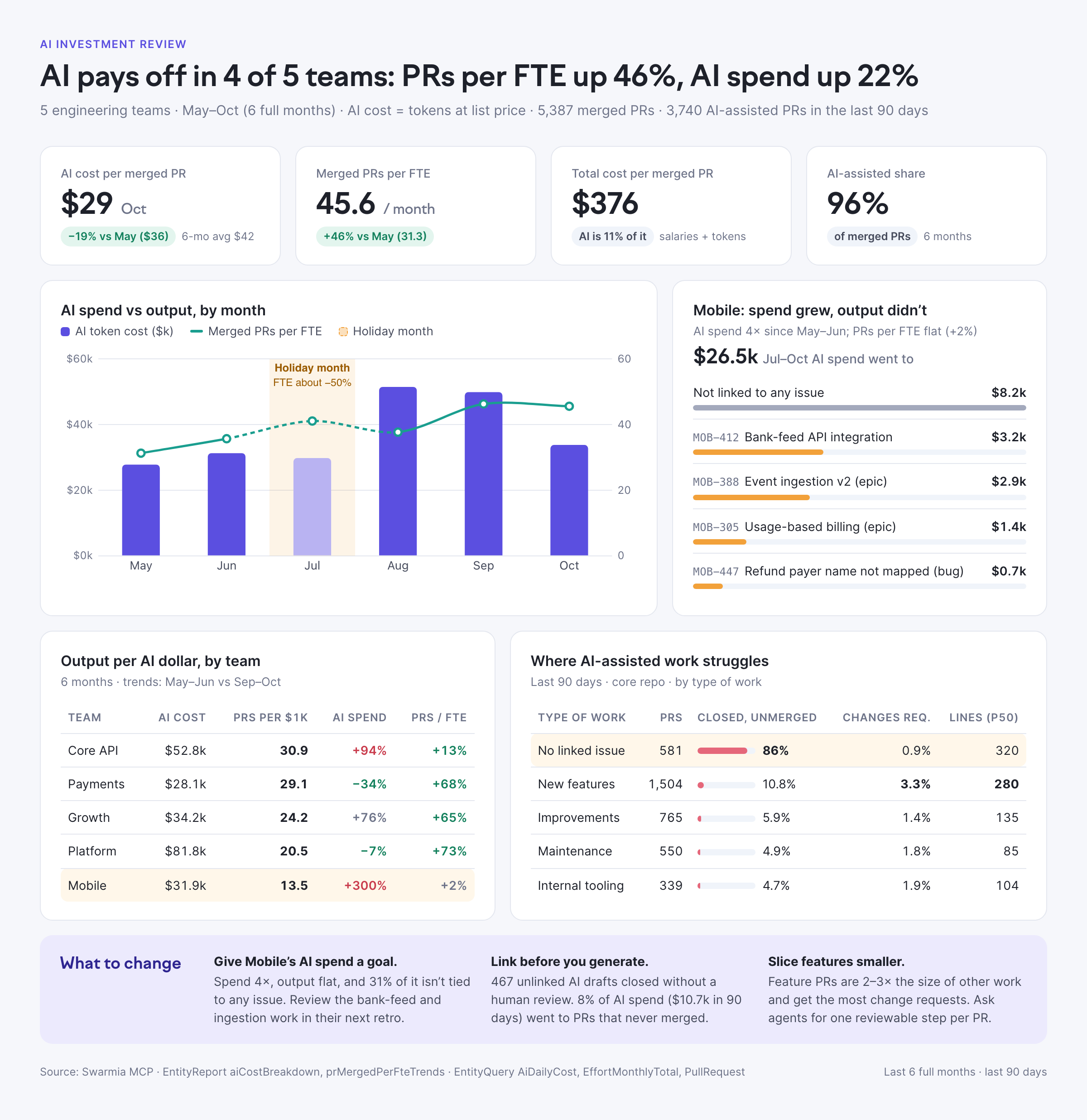
AI tool cost next to output per engineer and cost per merged pull request, by team. Where spend grew without output, it names the epics the money went to.

You

Is our AI investment paying off, and where? For the last 6 months, compare AI token cost with merged PRs per FTE and cost per merged PR by team. Name the epics where spend grew without output, show where AI-assisted work struggles by type of work, and flag holiday months.

  • EntityReport · aiCostBreakdown
  • EntityReport · prMergedPerFteTrends
  • EntityQuery · AiDailyCost
  • EntityQuery · PullRequest
ai-roi.html
AI investment analysis comparing AI cost with delivery output per team

For managers and directors

Find out why a number moved, whether the change is real, and where the team’s time actually goes.

Delivery

Find where delivery gets stuck

Change lead time broken into stages for every team, the biggest bottleneck in each, and the slowest pull requests behind it: what they have in common, and what to change.

You

Where is delivery getting stuck in each team? For the last 90 days, break change lead time into stages and check issue cycle time, flow efficiency and stuck issues. Then show me the slowest pull requests behind the biggest bottleneck and what they have in common.

  • EntityReport · metrics/dora
  • EntityQuery · Team → PullRequest stages
  • EntityQuery · Team → Issue flow
  • EntityQuery · PullRequest
bottlenecks.html
Change lead time by stage for each team, with the slowest pull requests
Statistical process control

Tell a real change from noise

Analysis that isn’t in any dashboard. The assistant pulls weekly medians from Swarmia and computes the control limits itself, so you know whether a dip is worth a celebration or a meeting.

You

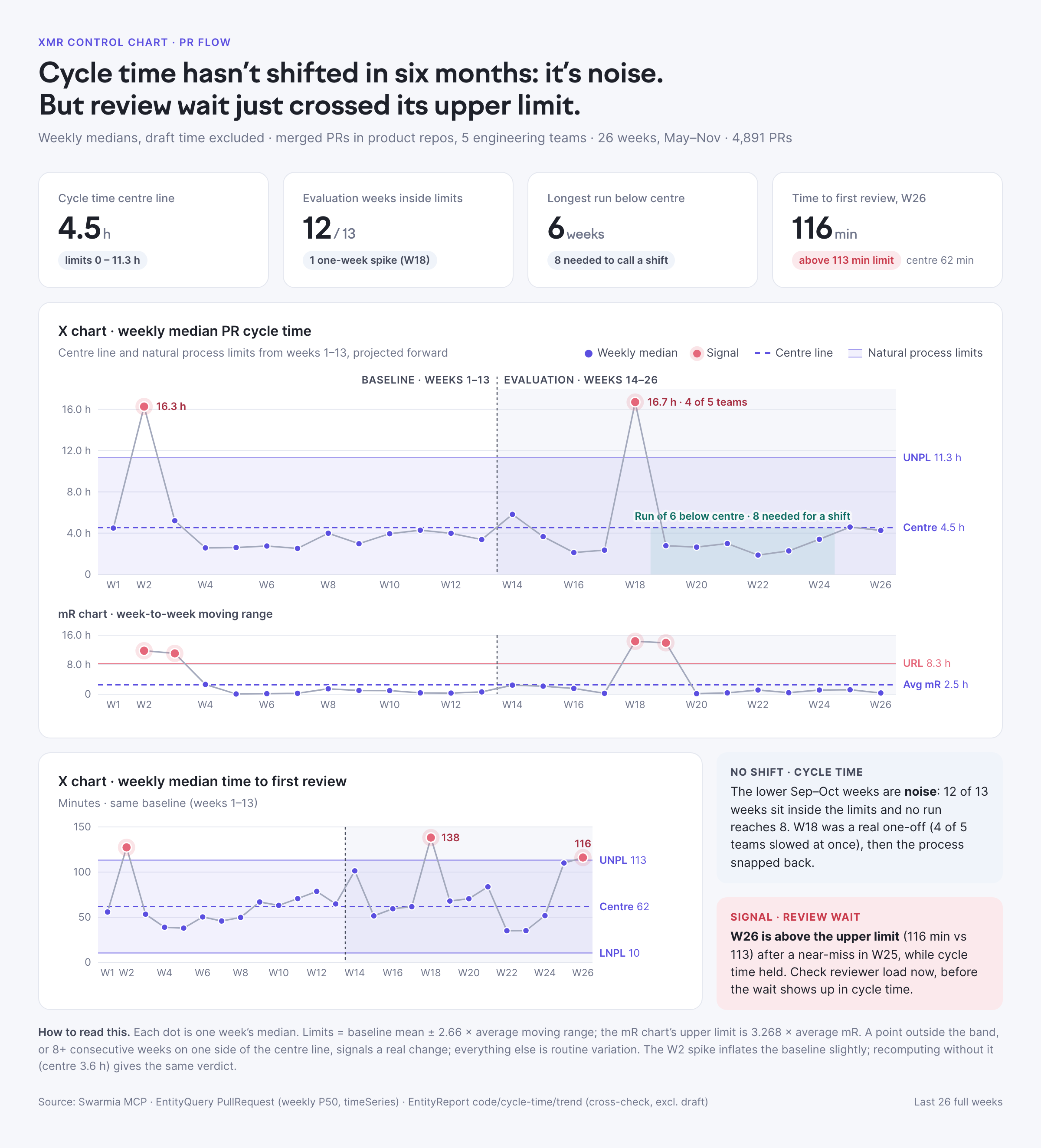
Draw an XmR control chart of weekly median PR cycle time and time to first review for the last 6 months. Use the first 3 months as the baseline, flag points outside the limits and runs of 8+, and tell me whether the process actually changed or it’s just noise.

  • EntityQuery · PullRequest · weekly P50
  • EntityReport · cycle time trend
xmr.html
XmR control chart of weekly median pull request cycle time
Investment balance

See what keeps the lights on

Effort in FTEs, by month and team, from Swarmia’s effort model, without timesheets. The repeats and the fixes worth funding.

You

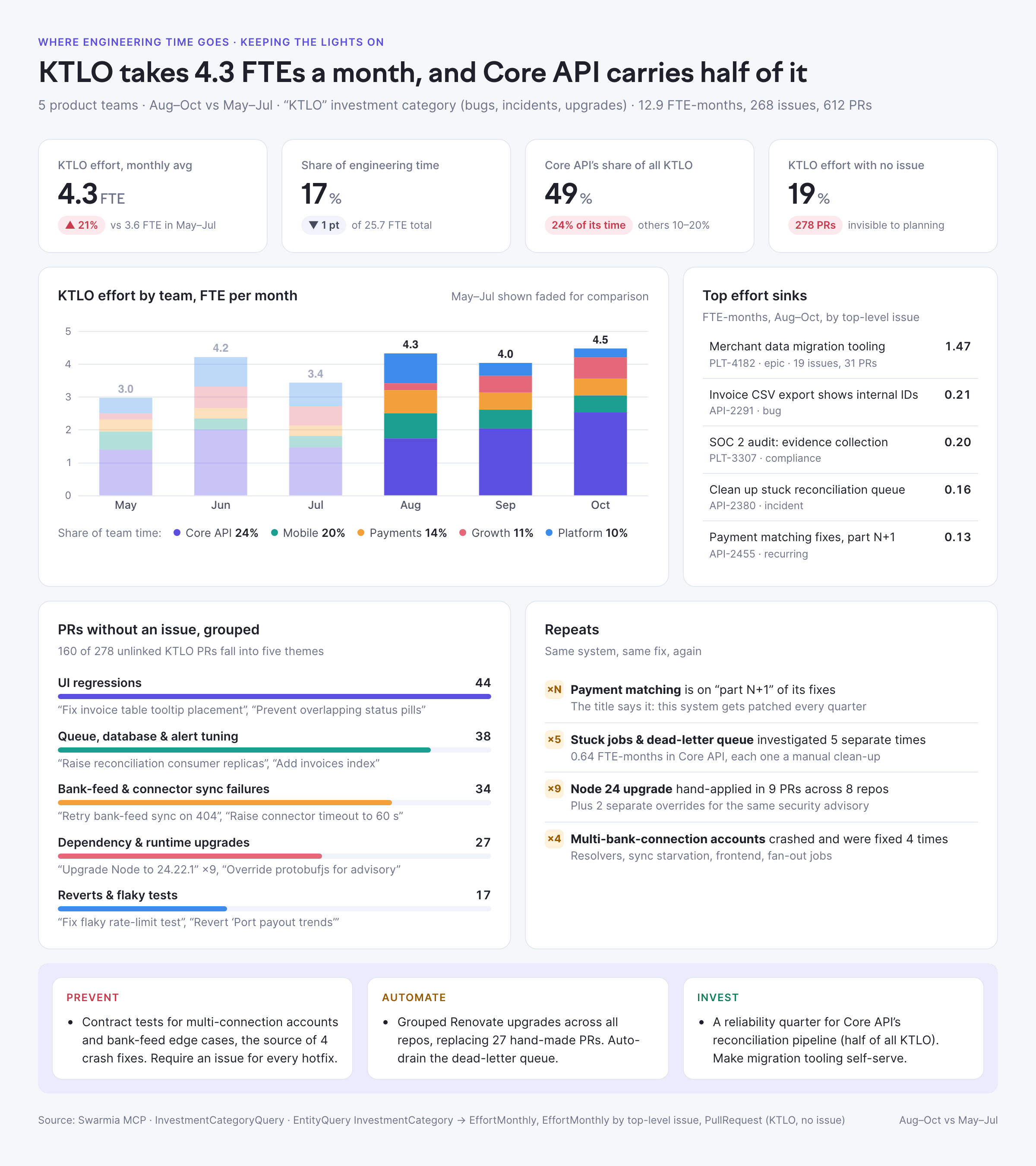
How much engineering time went to keeping the lights on in the last 3 full months, by month and team? Name the issues and epics that took the most effort, group PRs without an issue into themes, flag repeats, and say what to prevent, automate or invest in.

  • InvestmentCategoryQuery
  • EntityQuery · InvestmentCategory → EffortMonthly
  • EntityQuery · PullRequest
ktlo.html
Keeping-the-lights-on effort by team and month, with recurring work

For developers and their agents

Swarmia in the coding agent, in a scheduled job, or in a script with an API token. Agents get the same answers people do.

Agent sessions

Find where coding agents get stuck

Swarmia’s agent sessions capture how Claude Code and Codex work in your repositories. Ask where agents lose time, and get the developer-experience fixes that pay off fastest, for agents and people alike.

You

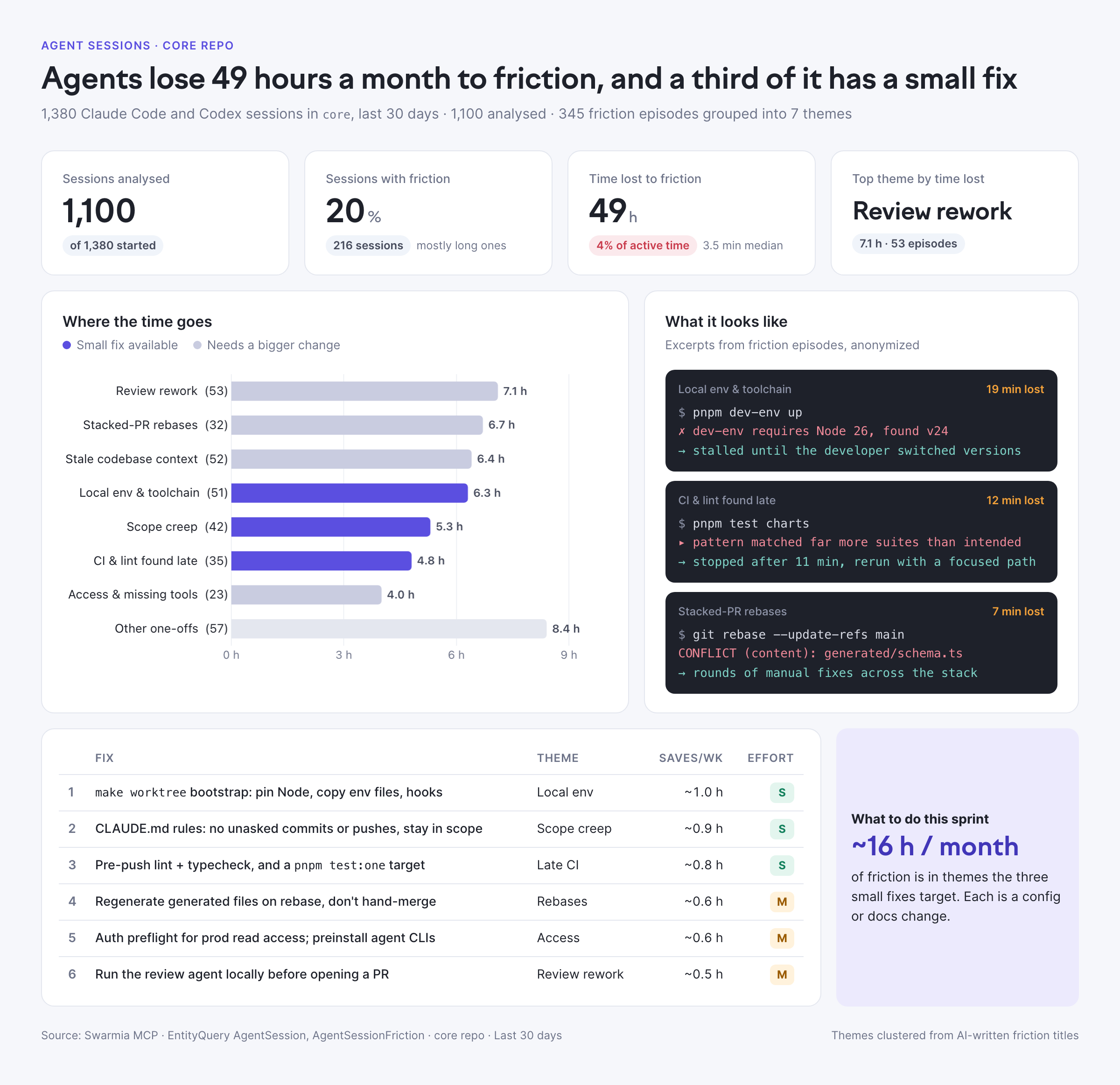
Find friction points from agent sessions in the core repo over the last 30 days. Group them into themes, show how often each happens and how much session time it costs, and rank the top developer-experience fixes by effort vs impact.

  • EntityQuery · AgentSession
  • EntityQuery · AgentSessionFriction
agent-friction.html
Friction themes from coding agent sessions, with quick-win fixes
In your editor

From a line of code to the why

Inside Claude Code: git blame finds the commit, and Swarmia connects it to the pull request, the review discussion, the issue, the epic and the people who know the answer.

You

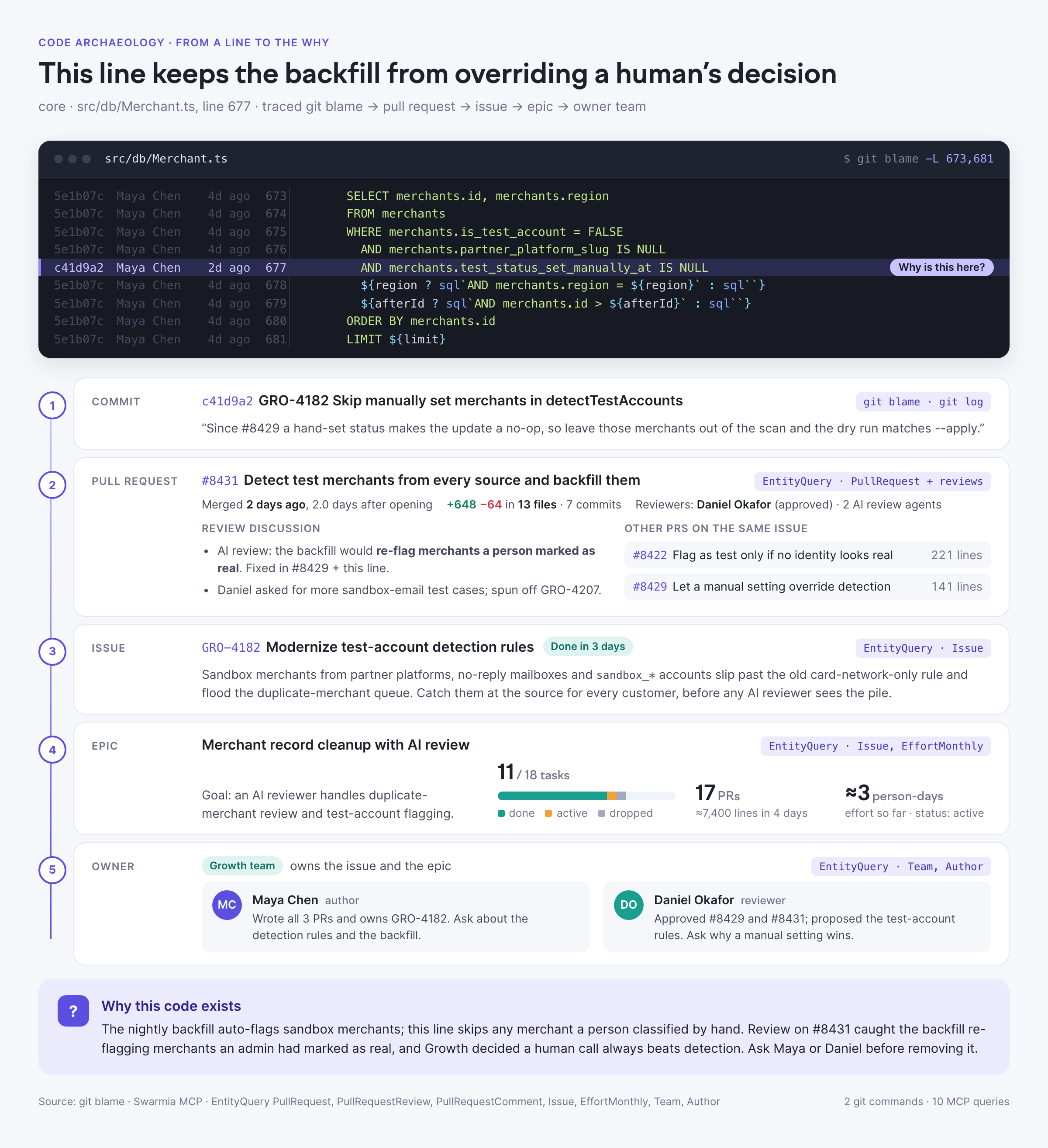
Why does line 677 of src/db/Merchant.ts exist? Run git blame, find the pull request in Swarmia, then follow it to the linked issue and epic. Tell me what the original requirement was, what came up in review, and who I should ask.

  • git blame
  • EntityQuery · PullRequest
  • EntityQuery · PullRequestReview
  • EntityQuery · Issue
  • EntityQuery · Author
code-why.html
Trace from a line of code to its pull request, issue, initiative and owner team
Scheduled agent

A morning check that ends in a fix

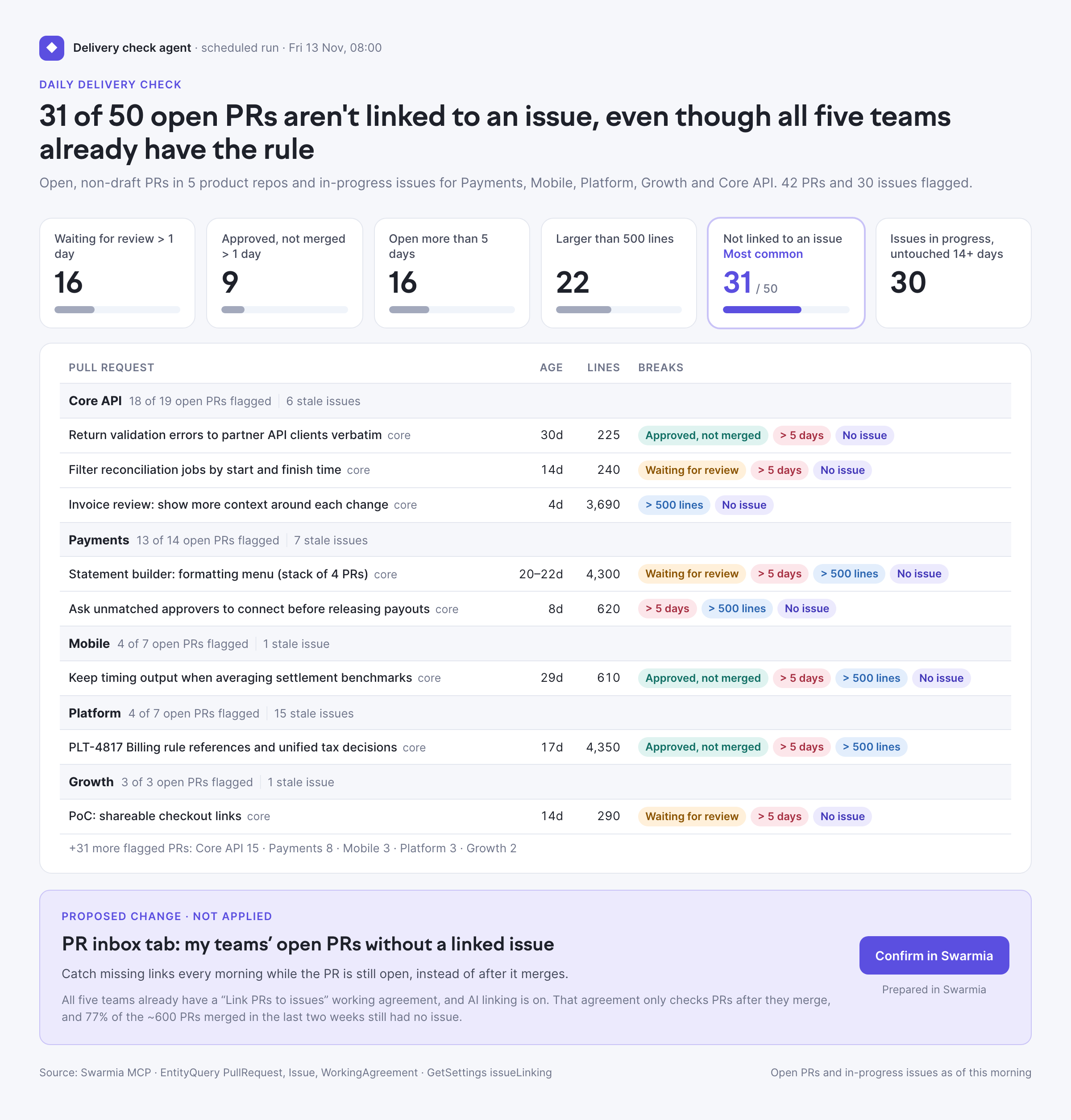
An agent with an API token checks your rules every morning, flags what breaks them by team, and proposes a fix. It even checks your existing working agreements first. Nothing changes until someone confirms it in Swarmia.

You

Every morning: check our open PRs and flag anything that breaks our rules: waiting for review over a day, approved but not merged, open more than 5 days, over 500 lines, or not linked to an issue. Group by team, then propose one change that prevents the most common problem.

  • EntityQuery · PullRequest
  • EntityQuery · Issue
  • EntityQuery · WorkingAgreement
  • GetSettings
hygiene.html
Daily pull request check grouped by team, with a proposed working agreement
Why not build it yourself?

Your agent can call GitHub and Jira. It can’t call a model of how your engineering organization works.

Most teams start here: an agent pointed at the GitHub and Jira APIs, or a vibe-coded script that pulls everything into a spreadsheet. It works for a demo. Then the answers have to be right every week, for organizations where thousands of pull requests merge every day, and you’re dealing with rate limits, missing history and data that doesn’t exist in either tool. Swarmia is the layer that has already solved that.

The questionSelf-built on raw GitHub and JiraAgent + Swarmia MCP
“What’s our median cycle time by team?”Page through every pull request in every repository, then guess teams from today’s membership.One query. Team membership as it was when each pull request was open, with drafts and bots handled.
“How much time goes to keeping the lights on?”There is no effort data to find. You end up counting tickets.Effort in FTEs per issue from activity, rolled up to epics and investment categories.
“Is AI paying off?”Token totals from a vendor console, with no link to what shipped.AI cost, AI-assisted pull requests and output per FTE, by team and by epic.
“What’s our change failure rate?”Work out deployments, reverts and rollbacks yourself, across CI systems.Deployments, reverts and rollbacks already detected, with the same definition everyone sees.
  • Complete, continuous data

    60+ integrations, from GitHub and Jira to HR systems and AI tools. Lost webhooks, rate limits and vendor API changes are handled for you, with full history.

  • Who is who, and in which team

    One engineer has five to ten identities across tools. Swarmia merges them, tells bots from people, and remembers who was in which team last March.

  • Work linked to code

    Pull requests linked to issues, epics and initiatives; work sorted into investment categories; deployments and change failures detected.

  • Metrics with the edge cases decided

    Cycle time, DORA and review metrics have dozens of decisions behind them. Your agent gets the same numbers your teams see in Swarmia.

  • An effort model finance trusts

    Person-days of effort per issue without timesheets, versioned and snapshotted. It’s what investment balance, capitalization and AI ROI are built on.

  • AI attribution

    Which pull requests and lines AI tools and agents wrote, what they cost, and how they did in review and production.

Answer → action

It doesn’t stop at the answer

When an analysis points to a fix, ask for it in the same conversation. Your assistant prepares the change, and nothing happens until you confirm it in Swarmia.

  • Working agreement

    “Set up a working agreement for the Payments team: pull requests get a first review within one business day.”

  • Key metric

    “Save change lead time as a key metric under our Delivery goal, so we track it every month.”

  • Pull request inbox

    “Add a tab to my inbox for pull requests waiting more than a day for a first review.”

  • Initiative

    “Create an initiative for every story with ‘billing API’ in the title.”

All MCP actions →

Security

Ready for your AI security review

  • Same permissions as the app

    Your assistant sees exactly what you can see in Swarmia, and nothing more.

  • You confirm every change

    Most tools are read-only. Actions prepare a change, and nothing happens until you confirm it in Swarmia.

  • OAuth or scoped tokens

    Sign in with OAuth, or give agents an API token with only the MCP scope.

  • No source code

    The Swarmia MCP server works with metadata like pull requests, reviews and issues. It doesn’t read your source code.

Setup

Connected in a minute

One server URL for every client: https://app.swarmia.com/api/v1/mcp

claude mcp add swarmia \
  --transport http "https://app.swarmia.com/api/v1/mcp"

Then run /mcp in Claude Code and sign in to Swarmia.

Full setup guide →Prompt library →

Frequently asked questions

What is the Swarmia MCP server?

It’s a remote Model Context Protocol server that connects AI assistants and agents to your engineering data in Swarmia. Ask questions in plain language in Claude, Cursor or your own agent, and get answers grounded in your organization’s pull requests, issues, deployments, effort, AI usage and surveys. The server URL is https://app.swarmia.com/api/v1/mcp.

Which AI tools does it work with?

Claude (web and desktop), Claude Code, Cursor and any client that supports the Streamable HTTP transport, including agent frameworks and scheduled jobs. It’s listed in the official MCP Registry as com.swarmia/swarmia.

What data can my assistant access?

Everything you can see in Swarmia: pull requests, commits, reviews, deployments, issues, sprints, initiatives, investment categories, effort, teams, AI tool usage and cost, agent sessions, survey results, working agreements and settings. Predefined reports give it the same DORA, code and AI impact numbers as the app. See the full data model.

Why not connect my agent to GitHub and Jira directly?

For one pull request or one ticket, that works. Questions across an organization take thousands of API calls. With GitHub allowing about 5,000 requests an hour per token, a year of history for a large organization can take days to fetch, and while it runs it uses up the rate limits your CI, bots and other integrations share, which can lock them out. You also hit missing history and data that doesn’t exist in either tool: who was in which team at the time, how much effort went into an epic, which work is maintenance, which pull requests AI wrote, and what counts as a deployment or a change failure. Swarmia has already joined and computed all of that, so your agent gets the answer in a few calls instead of thousands.

Can the assistant change things in Swarmia?

Yes, with your confirmation. It can set up working agreements, save key metrics, create initiatives, add pull request inbox tabs and change team settings. It prepares the change and gives you a link, and nothing changes until you confirm it in Swarmia. Notes are the only exception: they’re saved right away and marked as written by AI. See MCP actions.

Is it secure?

The MCP server uses the same permissions as the Swarmia app, so an assistant can’t see or do anything you couldn’t. You sign in with OAuth or use an API token with only the MCP scope. The Swarmia MCP server doesn’t read your source code, and we complete SOC 2 Type 2 and ISAE 3402 Type 2 audits every year. Read more on our security page.

Can I use it from scripts and scheduled agents?

Yes. Create an API token with the MCP scope and call the server from any agent or job. The server is stateless, so each request stands on its own, which makes it easy to run from CI, cron jobs or agent frameworks.

Where do I find good prompts?

The prompt library has tested prompts for CTOs, directors, managers, platform teams, finance, product managers and engineers. Each one ends with “Render it as an HTML page with a chart and a short summary”, which turns the answer into a shareable page in Claude.

Bring Swarmia into your AI tools
See what your own engineering data can answer.